NPMscan
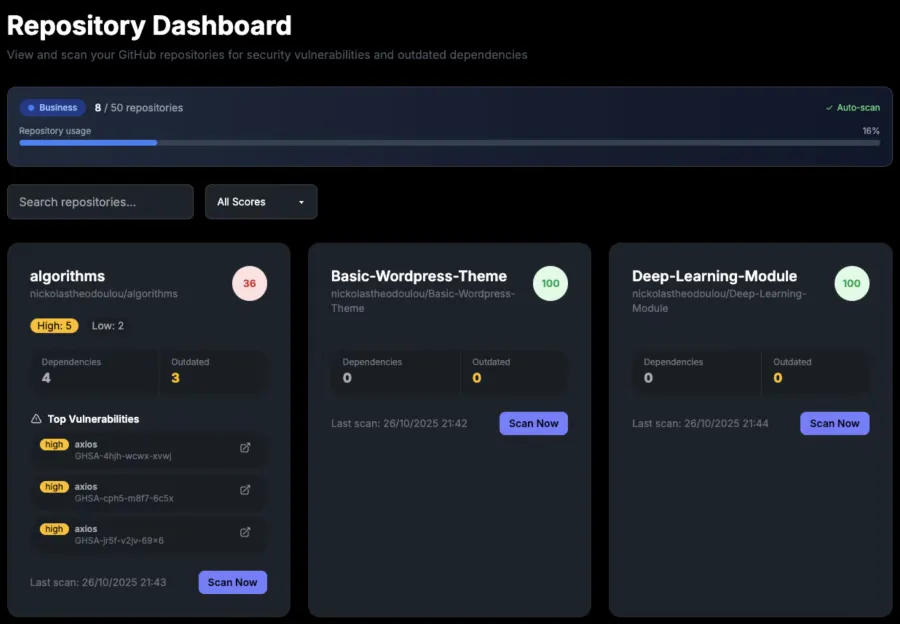
Freelancers and agencies ship a lot of projects, then move on. Side projects, client sites, things launched last year and forgotten. Each one keeps pulling in packages that later turn out to be vulnerable. NPMscan puts all of them on one page, worst first, and tells you each week what changed. I designed, built, priced and run it on my own.
Dependabot tells you about one repo at a time. You have twenty.
Per-repo alerts work for a team on one codebase. They break down for someone looking after a long tail of client and side projects, where the risky repo is the one nobody has opened in a year.
What I built
NPMscan reads the lockfiles each project already commits, so it checks the versions you actually install: npm, Yarn and pnpm (workspaces and monorepos included), Composer, Python (pip, Poetry, uv, Pipenv), Ruby, Go, Java (Maven and Gradle) and .NET. A Laravel API and the Vite front end beside it show up in the same report, with the right install command for each.
Every resolved version, including the packages your dependencies pull in, is checked against the OSV.dev database. Each finding comes with the release that fixes it, so the report reads as a to-do list rather than a wall of advisories.
Beyond packages, it flags a declared PHP or Node version, or an official Docker base image, that has stopped getting security fixes or soon will. That is the risk on a client site nobody has touched in two years.
A 0 to 100 health score per project sorts the list so the worst comes first. Every week NPMscan rescans and sends one short email: new advisories first, and a single line when nothing changed. No dashboard to remember to open.
Decisions that shaped it
The engineering is half of it. The rest is trust, pricing and onboarding, the same calls I help clients make.
GitHub has no read-only option for private repos, so the sign-in screen says "full control". Rather than hide that, the FAQ explains it: NPMscan only scans the projects you pick, only reads dependency files, never writes to your repos and never stores your source code.
The people with this problem are often one developer with twenty repos, so per-seat pricing would charge them for the wrong thing. Free covers 3 public projects; Indie is $5 a month for 15, Agency $29 for 75 and Studio $79 for unlimited, with private repos on every paid plan.
You can scan a public repo or look up any npm, Composer, PyPI, RubyGems, Go, Maven or NuGet package without an account. The product proves itself first, and the GitHub sign-in is the next step rather than the price of entry.
What it shows
A paid SaaS taken from idea to live product on my own: product, UX, copy, backend, billing and operations.
Nine package ecosystems plus Docker images and runtime versions in a single report.
Weekly rescans and summary emails on every plan, Free included.
Self-serve onboarding: sign in with GitHub, pick repos, and watch the first scan in about a minute.
What it runs on
Next.js (React, TypeScript)
GitHub sign-in through Clerk
AWS DynamoDB
Stripe subscriptions
OSV.dev vulnerability database
Scheduled weekly rescans and summary emails
Need a product built with security in mind?
The care that goes into NPMscan, least access, honest pricing and dependencies kept up to date, goes into the work I do for clients. Tell me what you're building.
Or email me directly at nickolastheodoulou@hotmail.com